
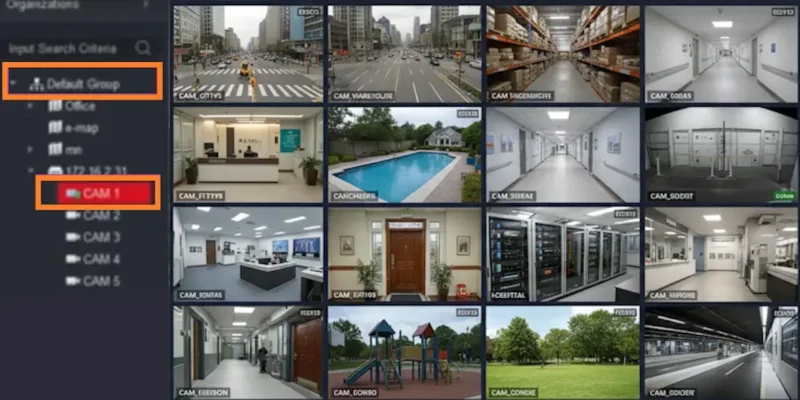
Choosing the right CCTV management software can significantly impact the efficiency of your security system. Among the most popular surveillance solutions available today, KVMS Pro stands out for its powerful monitoring capabilities, user-friendly interface, and support for multiple security devices. However, many users often find themselves confused when deciding between KVMS Pro Lite and KVMS Pro Full.
In this guide, we’ll compare both versions in detail to help you determine which one best suits your security needs.
Understanding KVMS Pro
KVMS Pro is a comprehensive video management software designed for monitoring CCTV cameras, DVRs, NVRs, and IP cameras from a centralized dashboard. It allows users to manage multiple devices, view live footage, access recordings, and receive security alerts.
For detailed setup guides, software updates, and user resources, visit KVMS Pro.
What is KVMS Pro Lite?
KVMS Pro Lite is a simplified version of the software designed primarily for small-scale users. It offers essential surveillance management features without requiring extensive system resources.
Key Features of KVMS Pro Lite
- Live camera monitoring
- Basic playback functionality
- Device management
- User-friendly interface
- Lower hardware requirements
- Suitable for home users and small offices
This version is ideal for individuals who only need basic surveillance monitoring without advanced management tools.
What is KVMS Pro Full?
KVMS Pro Full is the complete version of the software that includes advanced security and management features for professional use.
Key Features of KVMS Pro Full
- Multi-device monitoring
- Advanced video playback controls
- Event management
- Motion detection alerts
- User access control
- Multi-site management
- Enhanced storage and backup options
- Professional surveillance tools
The Full version is commonly used by businesses, warehouses, educational institutions, and organizations with large surveillance networks.
KVMS Pro Lite vs KVMS Pro Full: Feature Comparison
| Feature | KVMS Pro Lite | KVMS Pro Full |
| Live View | Yes | Yes |
| Playback | Basic | Advanced |
| Device Management | Limited | Comprehensive |
| Multi-Site Monitoring | No | Yes |
| User Permission Controls | Limited | Advanced |
| Motion Alerts | Basic | Advanced |
| Resource Usage | Low | Moderate |
| Business Use | Small Scale | Enterprise Level |
As shown above, both versions offer reliable monitoring capabilities, but the Full version provides significantly more flexibility and control.
Performance Comparison
KVMS Pro Lite Performance
The Lite version is optimized for users with standard PC configurations. It consumes fewer system resources and delivers smooth performance when managing a limited number of cameras.
KVMS Pro Full Performance
The Full version is built to handle larger surveillance environments. It supports more cameras, advanced recording options, and extensive management features. While it may require slightly better hardware, it delivers superior functionality for professional users.
Which Version is Best for Home Users?
If you are managing:
- A home security system
- A small retail shop
- A small office setup
- Fewer surveillance cameras
Then KVMS Pro Lite is usually sufficient for your requirements. It provides the essential monitoring features without unnecessary complexity.
Which Version is Best for Businesses?
Businesses often require:
- Multiple camera locations
- Centralized management
- User permission controls
- Event notifications
- Advanced playback tools
In such cases, KVMS Pro Full is the better option because it offers enhanced control and scalability.
For businesses planning to expand their surveillance infrastructure in the future, the Full version can provide a more future-proof solution.
Advantages of Choosing KVMS Pro Full
Many professional users prefer the Full version because it offers:
- Better scalability
- Advanced security management
- Improved monitoring efficiency
- Centralized device control
- Professional surveillance capabilities
You can explore additional guides and resources related to KVMS Pro software to better understand which version aligns with your specific requirements.
Final Verdict
When comparing KVMS Pro Lite vs KVMS Pro Full, the right choice depends entirely on your surveillance needs. If you’re a home user or managing a small security setup, KVMS Pro Lite provides everything necessary for day-to-day monitoring. However, if you require advanced management tools, multi-site monitoring, and enterprise-level control, KVMS Pro Full is the clear winner.
Before making a decision, evaluate the size of your surveillance network, future expansion plans, and required security features. Choosing the appropriate version of KVMS Pro will ensure efficient monitoring and long-term reliability for your security system.